Iterable Container
The Iterable Container widget allows developers to configure UI that needs dynamic rendering of repeating UI elements based on data collections. This is useful when displaying lists, tables, cards, or any UI components that should be generated dynamically from a dataset.
Key Features
- Dynamically renders UI components based on an array or list.
- Supports binding data.
- Enables custom layouts for each iteration.
- Supports nested containers for hierarchical data representation.
Note: To configure pagination, use the paginator widget.
Following are the properties to be configured for this widget:
| Property | Description | Comments |
|---|---|---|
| Bindings | ||
| DataSource | Specifies the data source for the Iterable container. | Supports all types of arrays (primitive and complex). |
| Additional Config | ||
| Current Item Alias* | Provide the alias name for the current item. The "Current Item Alias" is used to define a variable name that represents each individual item while iterating over a list (data source). This alias allows the user to reference the current item within the iteration. It acts as a placeholder for each item in the loop, making it accessible inside the iteration. Without it, the system wouldn’t know how to reference individual items in the list. | Example Use Case: If the data source is an array of products: [ { "name": "Laptop", "price": 800 }, { "name": "Phone", "price": 500 } ] If "Current Item Alias" is set as product, each item can be accessed as product.name and product.price. |
| Current Index Alias Name | Defines the alias name for the index of the current item. This is an optional field that allows you to assign a variable name to the index of the currently iterated item in the data source. | Purpose and Usage: Helps in tracking the position of an item in the iteration. Example Use Case: Data source: [ { "name": "Laptop" }, { "name": "Phone" } ] If set as index, you can access index as 0 for "Laptop", 1 for "Phone". How It Helps: - Displaying Serial Numbers - Applying Styles (e.g., even/odd rows) - Custom Logic based on index |
| TrackBy | Select Yes to enable. When iterating over a list, the container re-renders the entire list on data change. This may be inefficient for large datasets. Enabling TrackBy keeps track of unique identifiers and only updates affected items, improving performance. | Improves rendering efficiency on data change. |
| Comment | Indicates whether a comment is required or not. | Enable/disable commenting in the Iterable Container by selecting Yes or No respectively. |
Note: An asterisk (*) denotes that the property is mandatory for configuring the Iterable Container widget.
The "Configuration saved successfully" message displays upon successfully configuring the widget.
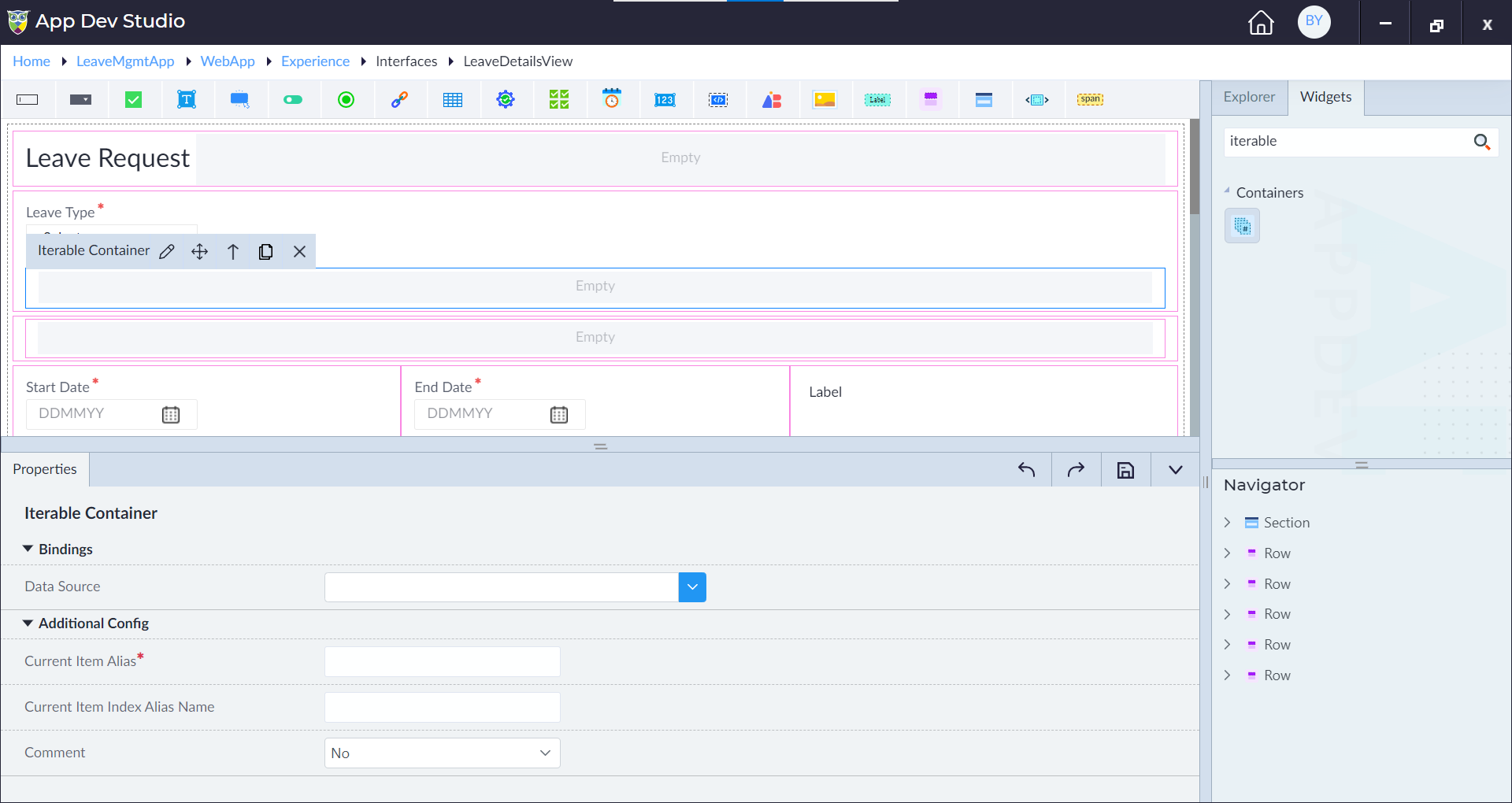
Drag the iterable container from the widget explorer onto the designer area.
When properties panel opens, select a datasource and specify the alias names for the Current Item and its Index.
For example, studentsList is selected as the data source, with the Current Item Alias and Index Alias specified. To display the details (Roll No, Name, DOB) of all students, the following widgets will be used inside the iterable container:
- A Numeric Textbox for Roll No
- A Textbox for Name
- A Datetime Picker for DOB
For the Numeric Textbox widget, the Value Binding options display the properties available from the Current Item Alias variable. Select current_student.RollNo for the Roll No field. Similarly, for the Textbox and Datetime Picker widgets, bind them to current_student.Name and current_student.DOB, respectively.
This is how the Current Index Alias and Current Item Alias variables inside the iterable container widgets can be accessed, along with the available models.