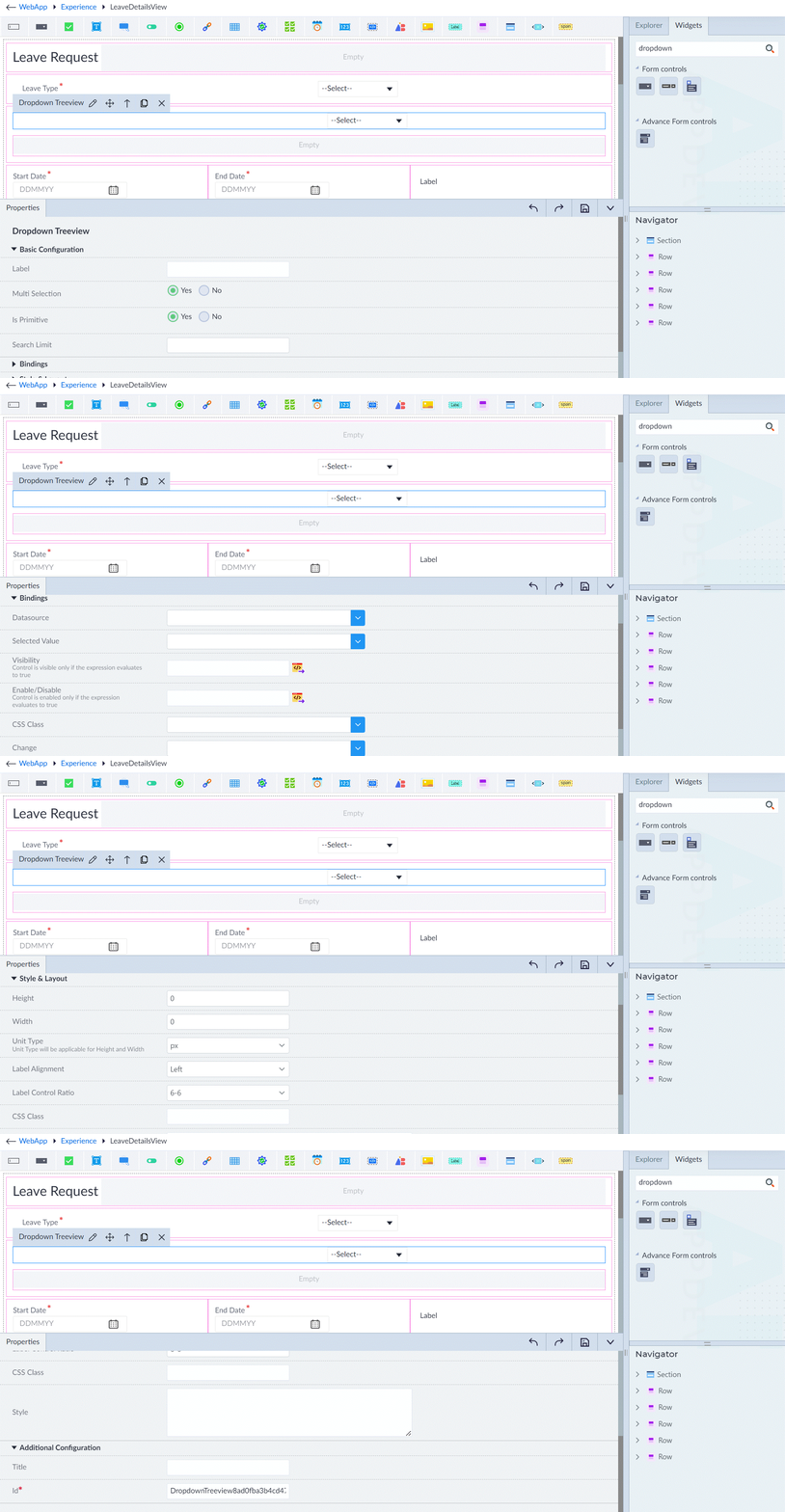
Dropdown Tree View
Dropdown TreeView is a UI widget that allows users to display hierarchical data in a structured, collapsible dropdown format. It allows users to expand and collapse nodes, making it ideal for displaying nested relationships such as file directories, category structures, organizational hierarchies, and more.
Key Features
- Enables seamless navigation through nested items.
- Users can expand or collapse tree nodes, select multiple or single items.
- Configure event handlers to trigger actions based on user interactions.
- Enhances usability by providing an intuitive way to explore and manage hierarchical data within applications.
Sample API Response:
this.files = [
  {
    label: 'Documents',
    expanded: true,
    children: [
      {
        label: 'Work',
        expanded: true,
        children: [
          { label: 'Expenses.doc' },
          { label: 'Resume.doc' }
        ]
      },
    ]
  },
  {
    label: 'Pictures',
    children: [
      { label: 'barcelona.jpg' },
      { label: 'logo.png' }
    ]
  },
];
Following are the properties to be configured for this widget:
| Property | Description | Comments |
|---|---|---|
| Basic Configuration | ||
| Label | Specifies the label for the dropdown tree view. | - |
| MultiSelection | Specify whether multiple selections are allowed. Select either Yes or No. Single selection: Only one node can be selected at a time. Multi-selection: Multiple nodes can be selected and stored in selectedValue. Default: Yes | - |
| Is Primitive | If set to Yes, selected values will be stored as primitive types (e.g., strings, numbers). If No, values will be stored as objects with label, value, etc. Default: Yes | - |
| Node Details Required | If Yes, additional details like metadata will be included in the output. If No, only basic info like label or value is returned. Visible only when Is Primitive is No. | - |
| Basic Bindings | ||
| Datasource | Select the model property from the dropdown. Expected structure: label – Text displayed, data – Optional extra data, children – Nested nodes, expanded – Optional boolean to expand, icon – Optional custom icon. | - |
| Selected Value | Select the model property from the list. Single selection: Stores selected node object. Multi-selection: Stores array of selected node objects. | - |
| Visibility | Provide the expression using the expression builder. | - |
| Enabled/Disabled | Provide the expression using the expression builder. | - |
| CSS Class | Select the CSS class. | - |
| Change | Select the event that can be triggered when an item is selected from the dropdown tree view. | - |
| Style & Layout | ||
| (Refer Common Configuration) | ||
| Additional Configuration | ||
| (Refer Common Configuration) |
Note: An asterisk (*) denotes that the property is mandatory for adding a Dropdown Tree View.
The "Configuration saved successfully" message displays upon successfully adding the widget.