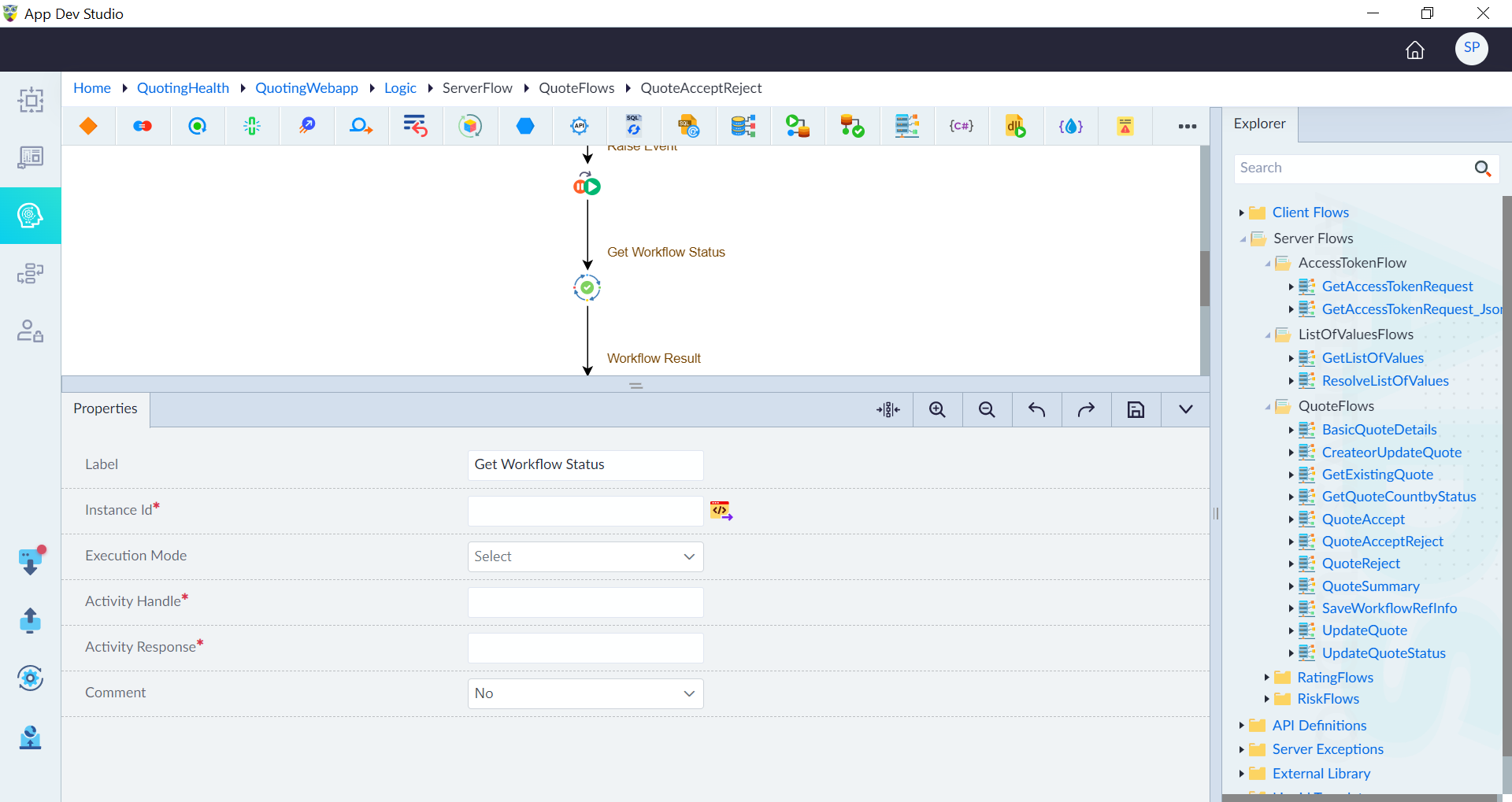
Get Workflow Status
The Get Workflow Status construct enables the user to retrieve real-time status of a specific workflow instance.
Monitoring workflow status is essential for tracking execution progress and ensuring workflows complete successfully. It provides real-time insights, enabling timely decisions based on the workflow’s progress.
The status helps detect issues early, manage long-running tasks efficiently, and trigger automation based on completion or failure.
Workflow Statuses
- Pending: The instance has been scheduled but has not yet started running.
- Running: The instance has started running.
- Completed: The instance has completed normally.
- Failed: The instance failed with an error.
- Terminated: The instance was stopped abruptly.
Get Workflow Status Properties
| Property | Description | Comments |
|---|---|---|
| Label | Labels help developers quickly understand each step in the logic flow. | It is recommended to provide a simple precise label that can improve the readability. |
| Instance Id* | Provide the instance id of the workflow for which the status is being read. | |
| Execution Mode | Specifies execution as Sequential or Async. | In asynchronous mode, the API call is made in the background, and the logic flow continues without waiting for the status. In sequential mode, the logic flow waits for the task to complete before proceeding to the next action. In synchronous mode, the workflow status is available immediately in the next step. In asynchronous mode, the response can only be accessed after explicitly awaiting the Activity Handle. The Http response can be accessed later by explicitly awaiting the Activity Handle.e.g.response = await GetOrderStatusHandle |
| Activity Handle* | A unique identifier required to store an asynchronous variable. | Activity Handle is used to track and manage asynchronous calls. Since asynchronous operations do not return responses immediately, the Activity Handle acts as a reference to monitor the execution and retrieve results when available. |
| Activity Response* | Specify a unique identifier required to store the actual output data. | By default, a name is populated after providing activity handler. It holds the workflow response received. It includes data such as the workflow result, status, error message, completion time. This property allows the user to read workflow response within the logic flow. |
| Comment | Specify whether to comment this construct or not. Either Yes or No. | If marked as Yes, the construct is treated as a commented expression and ignored in code generation. |
| Description | A brief explanation of the Get Workflow Status purpose. | Helps users understand the Get Workflow Status functionality. |
'Note: ' + ($args[0].Groups[1].Value -replace '\r?\n', ' ')