ForEach
The ForEach construct is often used to iterate over an array. This construct allows for repetitive operations, such as processing a list of objects or executing a series of commands for each item an array.
Follow the below steps to add the ForEach construct in a logic flow:
- In the designer canvas of a logic flow, drag and drop the ForEach construct into the flow.
- Double-click the construct to configure the properties as required and then click save.
| Property | Description | Comments |
|---|---|---|
| Label | Label for the construct for easy identification in a logic flow. | - |
| Iterable Objects* | Specify the looping object | The array serves as the data source for the loop |
| Current Item* | Specify the local variable | Variable to hold current item reference |
| Comment | Indicate if this construct should be commented out. Choose Yes or No. | If marked as Yes, the construct is treated as a commented expression and ignored in code generation. |
Note: An asterisk (*) denotes that the property is mandatory for adding the ForEach construct.
The success message displays upon successfully adding the construct.
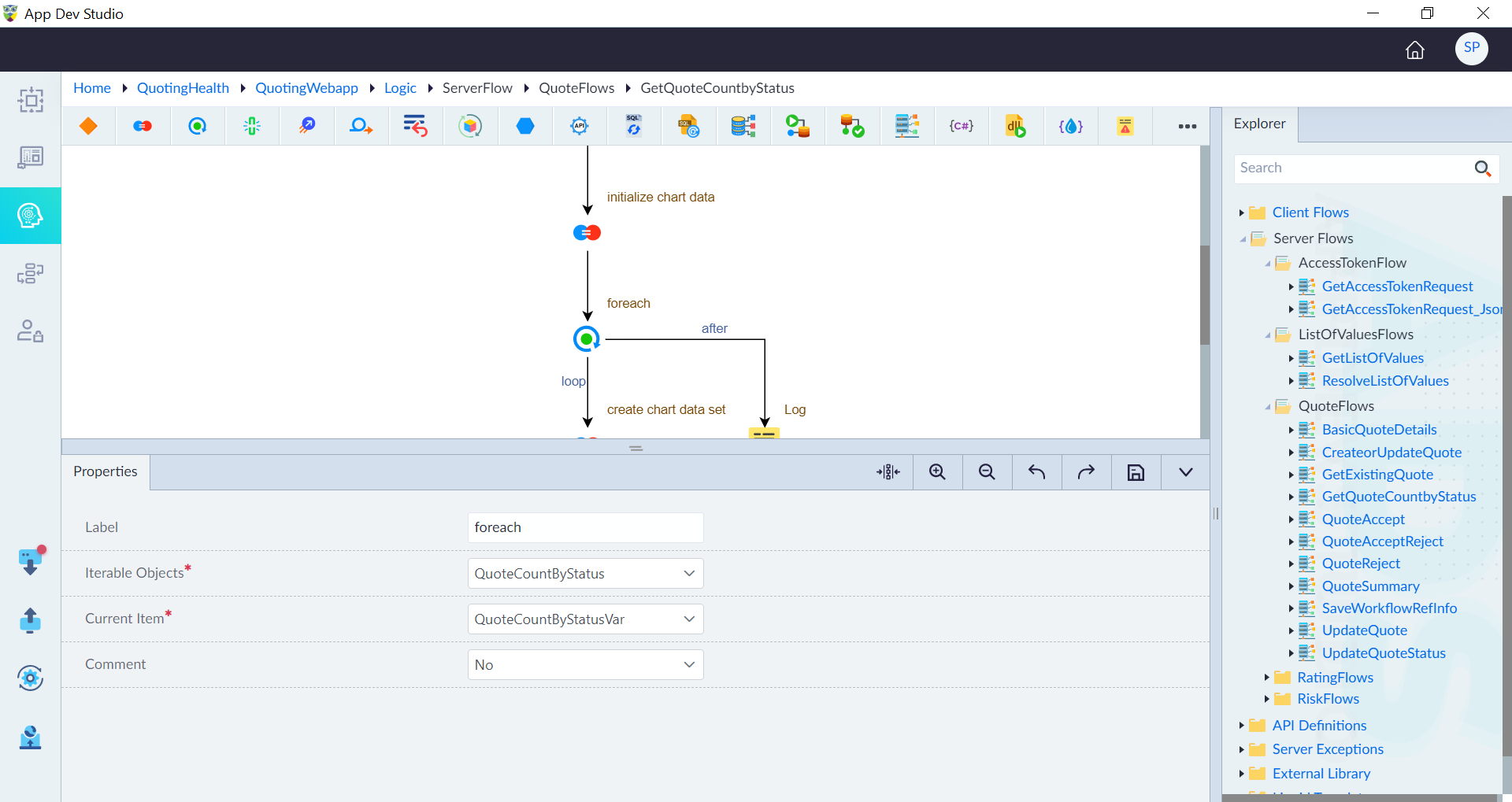
Edge Paths
Double-click on the edge path to configure the properties as required and then click save.
| Property | Description | Comments |
|---|---|---|
| Path | Select the edge path. Choose one of below: loop after | loop: Used to specify the logic run inside the foreach block. after: Used to specify the logic run outside the foreach. |