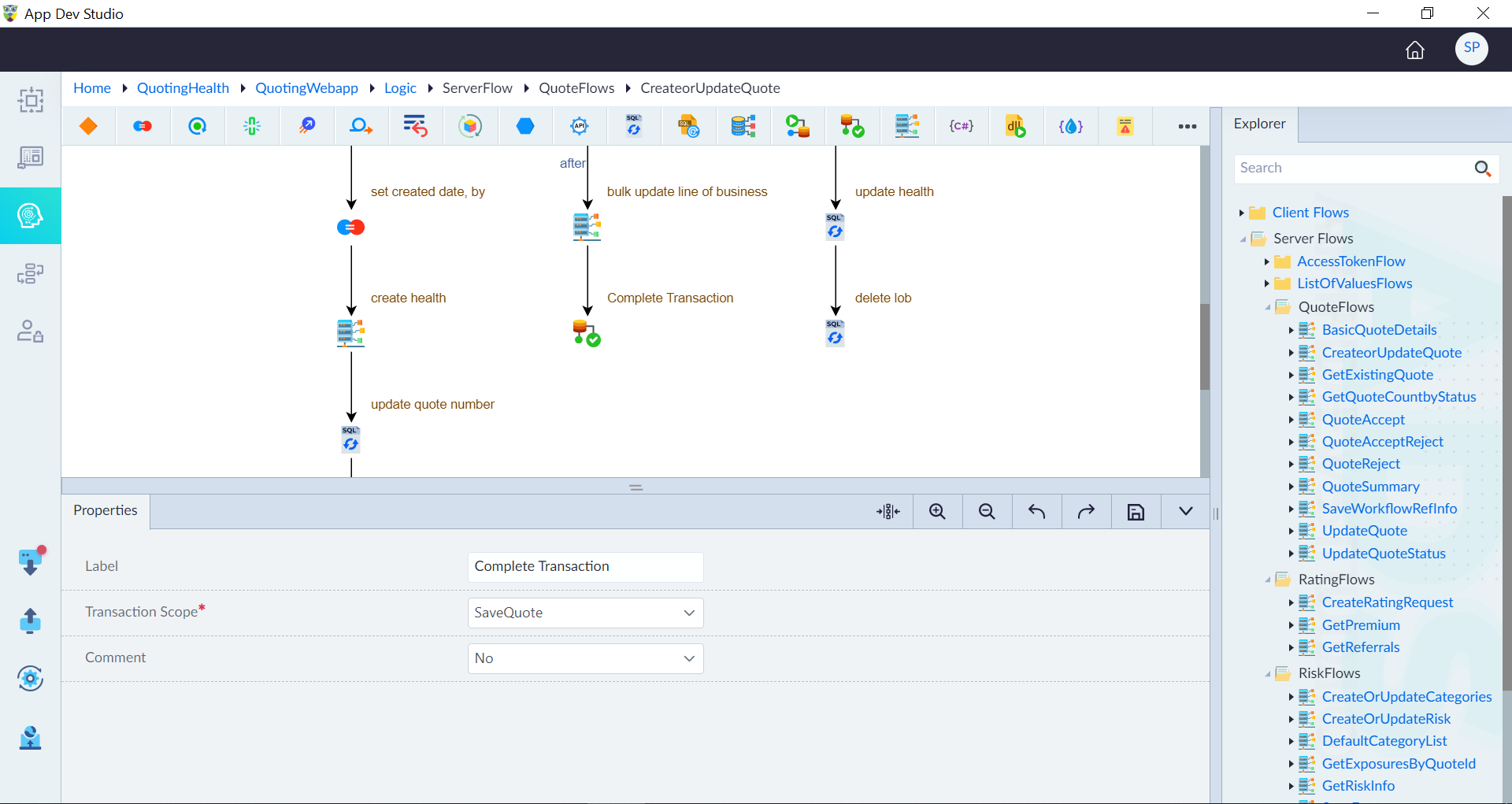
Complete Transaction
The Complete Transaction construct marks the conclusion of a transactional operation within a logic flow. It ensures that all activities within the transaction scope execute successfully, and changes are committed to maintain data integrity.
Purpose of Complete Transaction
✔ Commits changes made within the transaction.
✔ Ensures data consistency after successful execution.
✔ Finalizes the transaction scope to prevent unintended rollbacks.
Steps to Add the Complete Transaction Construct
Step 1: Drag & Drop the Construct
- Open the Logic Flow Designer Canvas.
- Drag and drop the Complete Transaction construct into the flow.
Step 2: Configure Properties
- Double-click the construct to open its properties panel.
- Configure the required properties:
| Property | Description | Comments |
|---|---|---|
| Label | Labels help developers quickly understand each step in the logic flow without examining the details of the construct. | It is recommended to provide a simple precise label that improves the logic flow readability. |
| Transaction Scope* | Select the transaction scope from the drop-down. | Mandatory field. |
| Comment | Determines if the construct is ignored in code generation (Yes/No). | If Yes, the construct is skipped. |
| Description | Summary of the Complete Transaction. | Optional. |
Note: An asterisk (*) denotes that the property is mandatory for adding the Complete Transaction construct.
Step 3: Save and Apply
- Click Save to finalize the settings.
Relationship Between Begin and Complete Transaction Constructs
| Begin Transaction | Complete Transaction |
|---|---|
| Begin Transaction | Complete Transaction |
| Starts a transaction | Commits the transaction. |
| Defines transaction scope | Finalizes changes within scope |
| Ensures queries execute as a single unit | Prevents partial execution by committing all operations |
| Rollback is possible if errors occur | Once committed, changes cannot be rolled back |
Example: Transaction Flow in OwlGen
- Begin Transaction → Initializes a new transaction.
- Execute database operations → Perform INSERT, UPDATE, DELETE, etc.
- Complete Transaction → If all operations succeed, commit the transaction.
Use Cases of Complete Transaction
Order Processing → Ensures order data and payments are committed together.
✅ Banking Transactions → Prevents incomplete fund transfers.
✅ Inventory Management → Updates stock only after successful order confirmation.
✅ User Account Creation → Commits all account-related data in one step.
The Complete Transaction construct finalizes transactional operations in a logic flow, ensuring safe, consistent, and reliable execution of database transactions.