Get Workflow Result
The Get Workflow Result operation allows retrieving the result, status, error message (if failed), completed time of a workflow instance.
How It Works
- A workflow instance is identified using its unique identifier.
- A request is made to fetch the result of the completed workflow.
- The system retrieves the final response, which includes success or failure details.
- The retrieved data is processed for further actions, such as decision-making or triggering new workflows.
- The retrieval process can be performed synchronously or asynchronously, depending on the execution requirements:
- Synchronous Execution: The workflow result is fetched immediately, blocking further execution until the response is received.
- Asynchronous Execution: The workflow result is retrieved without blocking, allowing other tasks to run concurrently while waiting for the response.
Steps to Add a Get Workflow Result Construct
Step 1: Drag & Drop the Construct
- Open the Workflow Designer Canvas.
- Drag and drop the Get Workflow Result construct into the flow.
Step 2: Configure Properties
Double-click the construct to open its properties panel.
Configure the required properties:
| Property | Description | Additional Comments |
|---|---|---|
| Label | Labels help developers quickly understand each step in the logic flow without examining the details of the construct. | It is recommended to provide a simple precise label that can improve the readability. |
| Workflow Name* | Select the required workflow being executed. | Must match the registered workflow name. |
| Workflow Version* | Select required workflow version from list. | Required for versioning selection. |
| Instance Id* | Provide the instance id of the workflow for which the result is being read. | |
| Execution Mode | Specifies execution as Sequential or Async. | In asynchronous mode, the API call is made in the background, and the logic flow continues without waiting for the response. In sequential mode, the logic flow waits for the task to complete before proceeding to the next action. In synchronous mode, the workflow response is available immediately in the next step. In asynchronous mode, the response can only be accessed after explicitly awaiting the Activity Handle. The Http response can be accessed later by explicitly awaiting the Activity Handle. e.g. response = await GetOrderStatusHandle |
| Activity Handle* | Provide unique name for the activity in the flow. | Activity Handle is used to track and manage asynchronous calls. Since asynchronous operations do not return responses immediately, the Activity Handle acts as a reference to monitor the execution and retrieve results when available. |
| Activity Response* | Provide a unique name for the activity response in the flow. | By default a name is populated after providing activity handler. It holds the workflow response received. It includes data such as the workflow result, status, error message, completion time. This property allows the user to read workflow response within the logic flow. |
| Timeout (secs) | Maximum allowed wait time for retrieving the result before the operation times out. | |
| Comment | Specify whether to comment this construct or not. Either Yes or No. | If marked as Yes, the construct is treated as a commented expression and ignored in code generation. |
| Description | Explains the purpose and impact of the workflow execution. | Provides context for workflow management. |
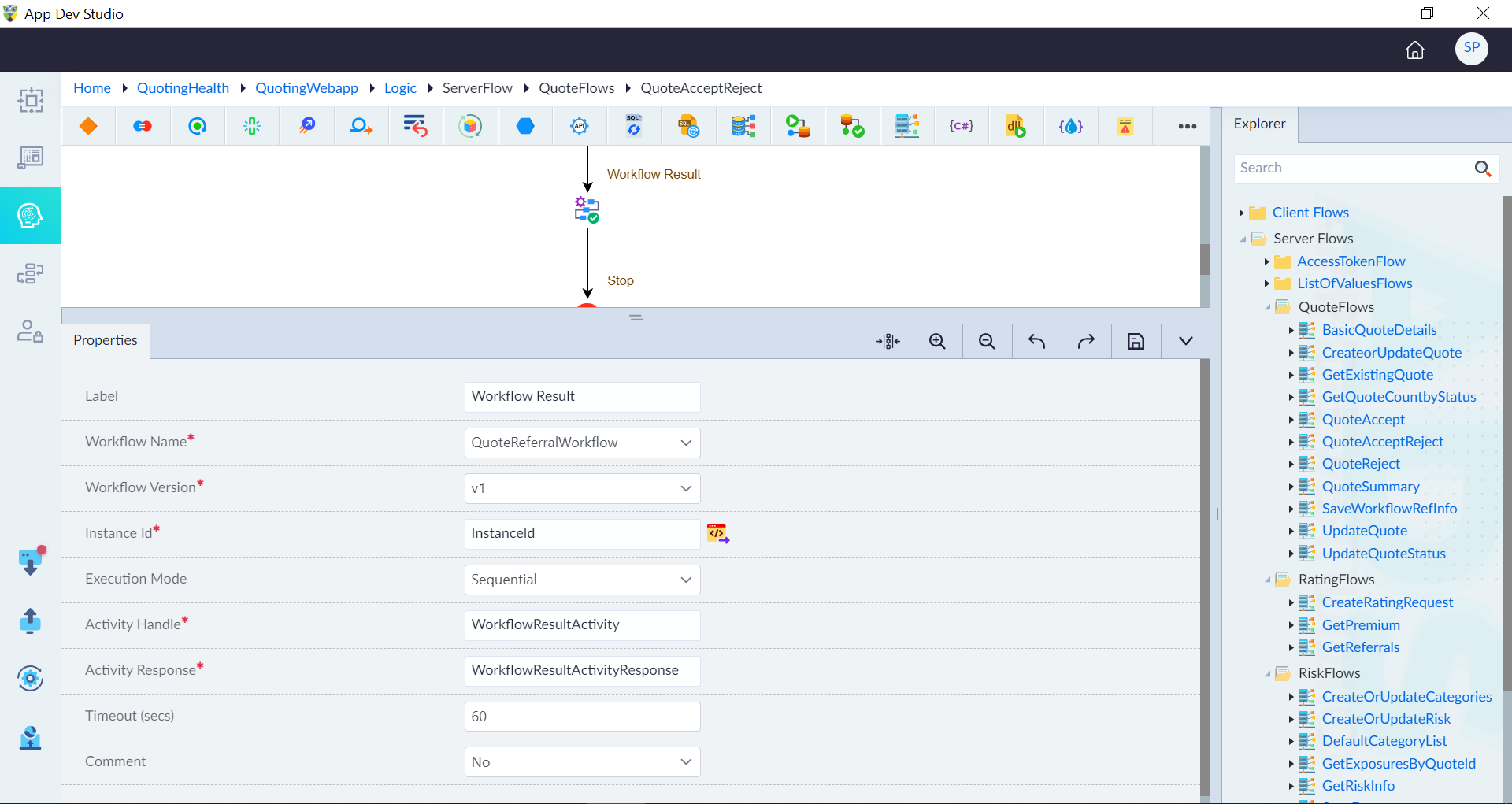
Notes:
- (*) Mandatory properties for adding a Get Workflow Result construct.
- A success message is displayed when a Get Workflow Result is successfully added.