API Definitions
Create API Definitions
An API Definition is a structured blueprint that outlines how external REST APIs function. It details their endpoints, data formats, authentication mechanisms, and communication protocols, serving as a reference for seamless integration with external services.
API definitions act as a saved blueprint that can be used across different logic flows to dynamically call external APIs. Instead of redefining API details each time, developers retrieve the saved API structure and use it to send requests, ensuring efficiency, consistency, and seamless connectivity with external systems.
Follow the below steps to create a new API definition:
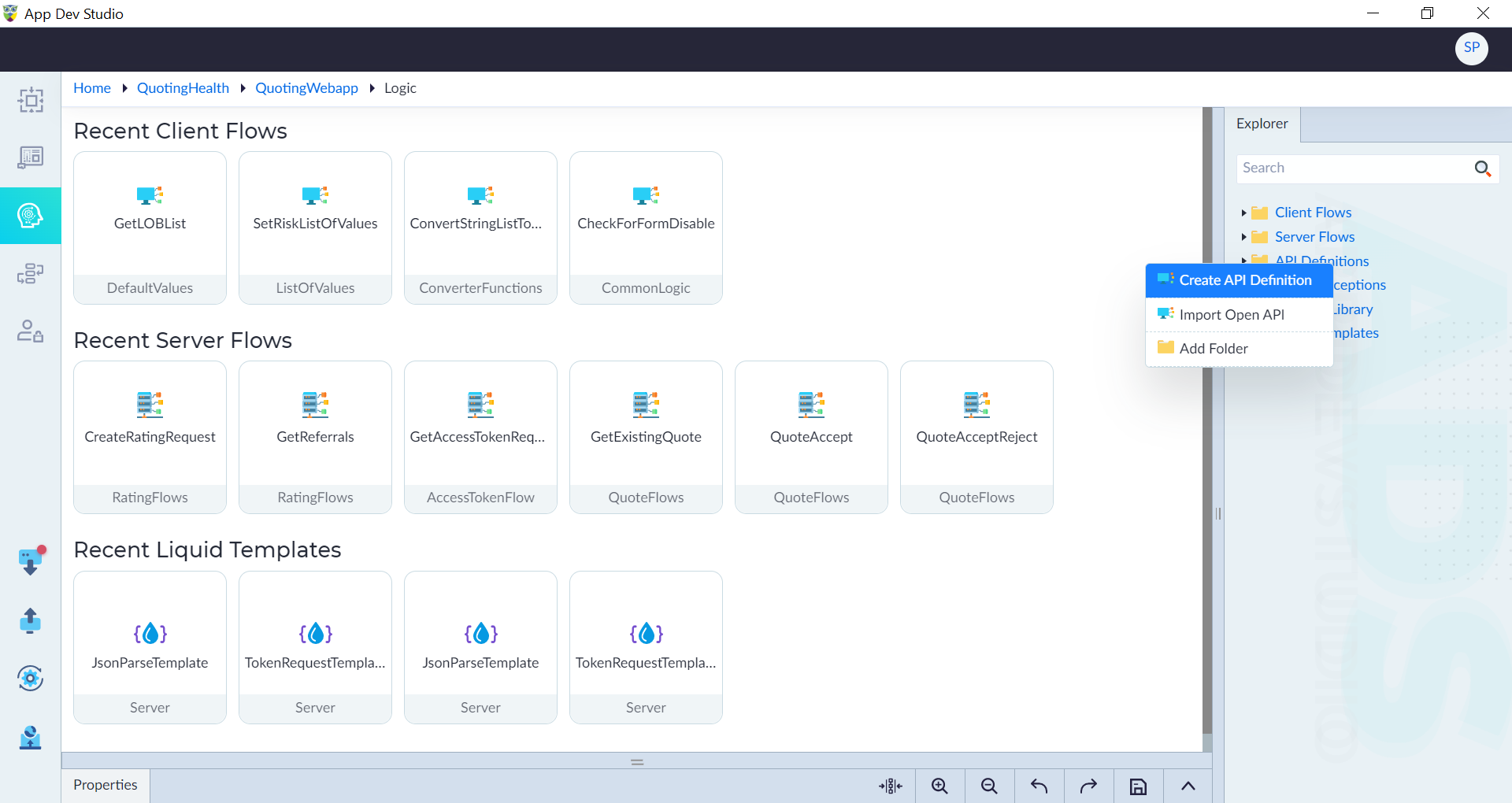
- From the explorer menu, right-click API Definitions and select Create API Definition.
- In the properties panel, configure the properties as required and then click save.
| Property | Description | Comments |
|---|---|---|
| Name* | A unique identifier for the API definition. | What It Supports: Starts with a letter (A-Z, a-z). Can contain letters, numbers, and underscores (_). Must have at least two characters. What It Doesn't Support: Cannot start with a number or underscore. Cannot contain spaces or special characters like @, $, #, !, - Cannot be empty. |
| Verb Type* | Defines the HTTP method used for the API request. | Examples include GET (retrieve data), POST (create data), PUT (update data), PATCH (modify data), and DELETE (remove data). |
| Consumes* | Specifies the format of data the API accepts. | Supported formats include JSON, FormData, XML, text, and URL-encoded. Defaults to JSON. |
| Produces* | Specifies the format of the API response data. | Supported formats include JSON, XML, Text, and File. Defaults to JSON. |
| URL* | A structured address used to access and manipulate resources via HTTP methods. | Types: - Base URL: Specifies the server environment (development, production, etc.) and can be configured in the Run Module under API Settings or Web Settings. - Action URL: Defines the specific API endpoint that performs a particular action and is appended to the Base URL. |
| Description | A brief explanation of the API's purpose. | Helps users understand the API's functionality. |
| Is Active | Specify whether the API definition is active for accessing. Either Yes or No. | Options: Yes (active) or No (inactive). Defaults to Yes. |
Note: An asterisk (*) denotes that the property is mandatory for creating an API definition.
The "API Definition added successfully" message displays upon successful creation.
Import Open API Definitions
Users can easily import third-party OpenAPI specifications to connect with external services. The Swagger JSON file is imported to define and document OpenAPI specifications, enabling seamless API documentation and interaction. Once imported, the Swagger definition can be used to integrate APIs into different logic flows, enabling seamless interaction within the application. You can include headers such as authorization tokens during API calls.
Important:
- OwlGen supports OpenAPI specification version 3.0 or higher.
- Importing API Definitions with same name as the existing API's will be overwritten.
- Headers added will be included in all API Definitions.
- If newly added headers have the same name as existing headers in the API definitions, the new headers will overwrite the existing ones.
- While importing an OpenAPI document, the user will receive a table listing entities if duplicate entities are detected in the target folder.
The user can specify a new name in the "New Entity Name" column, Otherwise entity definitions with the same name will be overwritten.
Steps to Import an Open API Definition
- From the Explorer menu, right-click API Definitions and select Import OpenAPI.
- In the Import API Definitions pop-up window:
- Click Choose File to browse for the OpenAPI specification file.
- Click Import to complete the process.
Import Open API Properties
| Property | Description | Comments |
|---|---|---|
| Choose open API document (json)* | Choose Swagger Json file. | - |
| Target folders for entities to be imported* | Specify the target folder name. Entities will be imported into the target folder in the Entity module. | Entity Definitions with the same name will be overwritten and also you can change the name if there are duplicates in the same folder. |
| Base URL Key* | Specify the unique server environment key (development, production, etc.). | The URL should be provided in RUN Module in API Settings. |
| Headers | Headers are key-value pairs in HTTP requests and responses used for metadata like authentication, security, and content type. | - |
Note: An asterisk (*) denotes that the property is mandatory for importing.